
How Do You Build Brand Loyalty with an Agent That Forgets Your Tool Every Session?
I deconstructed a viral HN thread to find out why agents keep picking the wrong tools. The answer isn't better SEO. It’s architecture, negative constraints, and the end of the 'marketing moat'.

A developer posted a question on Hacker News three days ago. It started with 11 points and 6 comments. By the time I finished drafting this piece, it had grown to 37 points and 21 comments with some of the most concrete, hard-won practitioner knowledge I’ve seen on the subject anywhere.
The question was simple: how do you know if AI agents will choose your tool?
With humans, you have SEO, copywriting, word of mouth. But an agent just looks at available tools in context and picks one based on the description, schema, and examples. YC had just published a video on the “agent economy” describing agents as autonomous economic actors, selecting products and services without human input and the question was whether you could engineer your way into being chosen.
Getting an agent to choose your tool is a two-stage problem. Almost everyone is only solving one stage of it. Let’s make this concrete with something we’ll carry through the whole piece.
You’re a PM building a report-generation tool. It takes structured receipt data and produces formatted expense summaries (fast, accurate, purpose-built for the job). You expose it via MCP alongside a dozen other tools in your agent context, including a general-purpose data-processing tool that can technically do the same thing if the agent prompts it correctly.
Your tool is the right one for this job. The agent keeps picking the other one. Let’s figure out why and why the fix might not be what you expect.
The problem that happens before your description is even read
Here’s the thing: if you have more than about 15 tools in your agent context, there’s a reasonable chance the agent isn’t reading your description with full attention. It might not be reading it meaningfully at all.
When a session starts, every connected MCP server dumps its full tool schemas into the context window at once. So in our example: the agent receives your report tool’s description alongside every other tool like the data processor, the file manager, the API caller, whatever else is connected. All of it, upfront, before any question is answered. Anthropic tracked real customer setups and found a five-server MCP configuration with 58 tools burns roughly 55,000 tokens just loading in.
Ever looked at the number of tools loaded in your VSCode for every call?
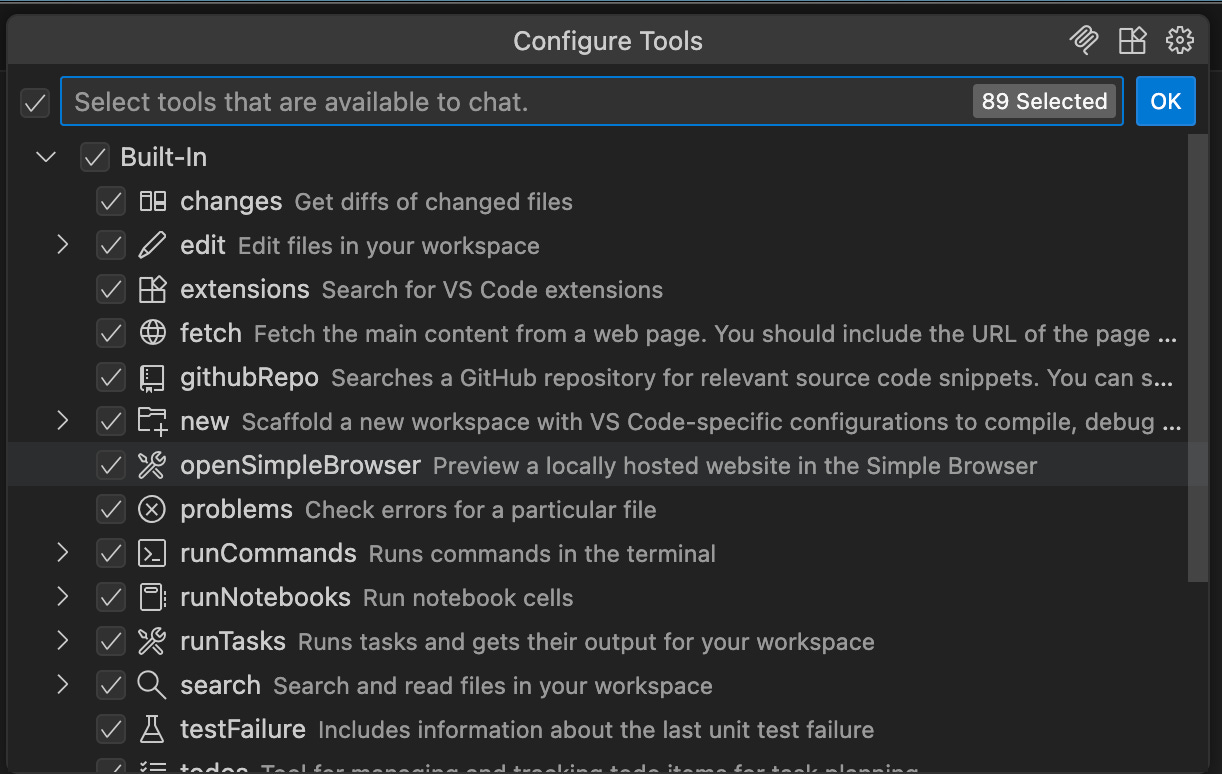
In other words: if your context has 30 tools, the agent isn’t carefully comparing your report tool’s description against the data processor’s. It’s pattern-matching under attention pressure and your position in the list may be doing more work than the words you wrote. Your description could be perfect and still lose to a mediocre tool that loaded in at position three..
The point isn’t which architecture you choose. It’s that no amount of description improvement fixes a Stage 1 problem. If the agent is drowning in tool definitions, rewriting your description is rearranging deck chairs. Fix the architecture first. Get the tool count down before the agent makes its selection decision. Then the description work actually matters.
But let’s say you adds a routing layer. Scoped dispatch, five tools per task. The report tool is in the room. Now what determines whether the agent picks it?
What actually moves the needle once your tool is in the room
The description is your entire pitch. The agent reads it once, decides, and moves on. Your tool is exactly what fits in a JSON object and the description field is the only thing with room for persuasion.
It won’t follow links to your docs. It won’t read your README. It won’t run a test query to see what comes back.
How do you fix this? Here’s what the practitioners found actually moves selection.
Write the negative case before the positive one. This was the single most consistent finding in the thread . The instinct is to describe what your tool does. The higher-leverage move is to describe what it doesn’t.
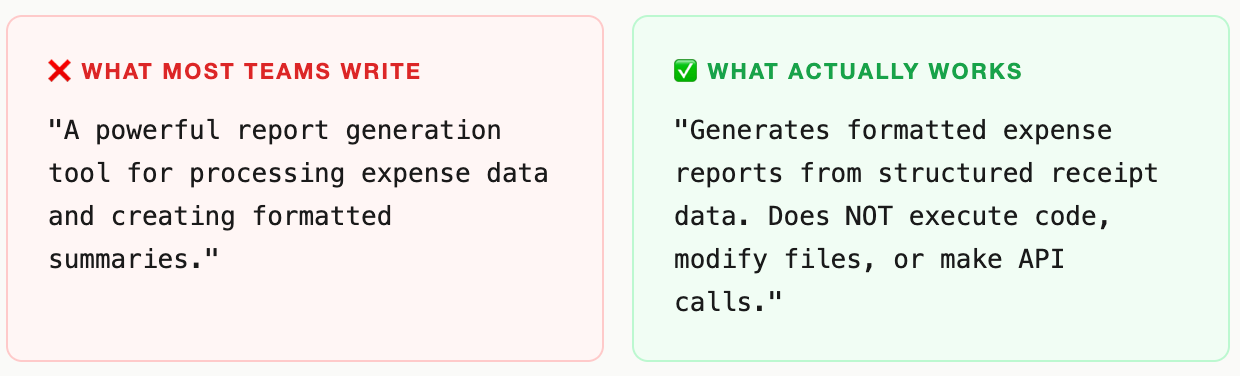
Think about the report tool this way. The general-purpose data-processing tool can technically do the same job. The agent’s selection decision comes down to which description makes the boundary clearest. If yours says “generates expense reports” and the other says “processes structured data,” the agent is guessing. If yours adds “does NOT process arbitrary data formats or execute code,” the agent stops guessing.Trigger words do more work than general descriptions. This was the insight I hadn’t seen articulated anywhere before this thread: maintaining explicit trigger word lists per skill i.e. specific phrases that should activate each tool. Without them, agents pattern-match on vague capability language and get it wrong roughly 30% of the time. With trigger phrases embedded explicitly in the description: under 5%. If a user says “compile my receipts into a summary,” does your description contain language that maps to “compile” and “summary”? Or does it say “generates expense reports” and leave the agent to figure out those are the same thing? Don’t leave that inference to the model. Build the map and put it in the description.
Inline examples beat external documentation, every time. Agents don’t follow links. This sounds obvious once you say it out loud, but it runs against every instinct teams have about good developer documentation practice. If you link to your docs in the description field, the agent will not go there. If you put one concrete example directly in the field like “Use this tool when a user asks: ‘Can you compile my receipts into an expense summary?’”. The agent has something to pattern-match against on every single call.
The format that works: one scope sentence, one negative boundary, one example. Roughly 50 tokens. It does more work than a 500-word README that the agent will never read.
Your tool is in the room. You have the right description. You still lose. Why?
Even with a clean description, you can lose the call on the schema. The description gets the agent to your door. The parameter design determines whether it walks in cleanly or stumbles on the threshold.
Schema is the real interface. Clean parameter names with sensible defaults beat elaborate descriptions.
One example that illustrates this problem : query: string gets called correctly and consistently across model families. search_query_input_text: string doesn’t, even when it means exactly the same thing. The simpler name maps naturally to how models have learned to reason about inputs during training. The verbose name introduces an ambiguity the agent has to resolve and sometimes doesn’t infer correctly before it can even form the call.
Two things matter most beyond naming. First, explicit format guidance: if a field expects an ID formatted as “ORD-123456,” say so, with an example inline. Agents will hallucinate plausible-looking formats when you don’t constrain them, and a plausible-looking wrong format is worse than an obviously wrong one. Second, clear required-versus-optional semantics: an agent trying to minimize call friction will skip uncertain parameters and cause silent failures, or fill them with guesses that create errors until something breaks much further downstream.
This is UX design for a machine audience. It has exactly the same stakes as UX for humans. It just has different users.
How to build “brand” in the agent economy
Most framing of agent tool discovery assumes you’re optimizing for something like human brand preference like trust accumulated over time, word of mouth, reputation. That’s not how it works at all.
Every agent invocation is a cold start. The model reads your description and decides, fresh, with no memory of previous successful calls. No loyalty. No trust built up over a thousand prior interactions. The agent that picked your tool correctly 500 times last week has exactly zero preference for it today. The decision is made entirely on what the model reads in that context window, in that moment.
That sounds discouraging. It’s actually the opposite.
It means the best-described tool wins every single invocation regardless of who built it, how long it’s been around, or what brand the maker has. A well-crafted description from a solo developer beats a vague one from a well-funded company every time. The competitive moat isn’t brand. It’s craft.
Same description. Different models. Different results.
One more wrinkle that most teams discover the hard way: a description optimized for Claude may not behave the same way with GPT-family models, and vice versa. Claude is more conservative — it will ask for clarification before guessing when the description is ambiguous. Other models fire speculatively and recover from errors. These aren’t style differences. They’re fundamental differences in how calling confidence is computed from your description.
If your tool needs to work across model families, you should run evals against each target model separately. Treat selection accuracy as a conversion metric. Optimize for your worst performer first.
So what to actually do in practice?
Let’s bring it back to the report tool and the decisions that determine whether an agent picks it.
Solve the architecture problem first. If your context has more than 15 tools and no routing layer, start here. Scoped dispatch (3–5 tools per task), use lazy-loading, or use Anthropic’s Tool Search (85% reduction, but Claude-only). No description improvement compensates for attention-degraded context.
Write the negative case before the positive one. “Do not use this tool when...” is the single highest-leverage sentence in your description. Write it first. It will make every other word you write more precise, and it removes the boundary inference the agent was making badly.
Build a trigger word list and embed it. List the specific phrases a user might say that should invoke your tool. Embed them explicitly in the description. Without this, agents pattern-match on vague capability language and get it wrong roughly 30% of the time.
Put one concrete example directly in the description field. Not in a linked doc. Not in the README. In the field. Format: “Use this tool when a user asks: [specific request].” It’s 20 tokens and it does more selection work than a 500-word README the agent will never read.
Design your schema like a UI. Use
queryoversearch_query_input_text. Format examples inline for any structured field. Explicit required/optional semantics. Every ambiguity is a potential wrong call or a silent downstream failure.Run evals across model families, not just one. Send 20–30 representative queries through each target model. Measure selection accuracy separately. Optimize for the worst performer first because your users won’t all be on the same model.
Rotate context before it degrades. In long sessions, optimal rotation point is 60–70% context usage. At 80%+, auto-compaction races with any cleanup and selection quality degrades faster than you can intervene.
Whose job is this, exactly?
The PM inside you would ask: who is supposed to own this? It’s not purely engineering. The description is a product decision about how you want agents to understand your capability. It’s not marketing as the audience is a model doing probabilistic pattern-matching, not a human responding to copy. It’s not DevRel as it requires understanding how specific model families reason about tool selection under uncertainty.
This is a new discipline without a team or a title. The tools to measure it are model-specific evals, description quality audits, semantic retrieval benchmarks. The window to get ahead of it is open right now, while most teams still treat tool documentation as the last thing they finish before shipping.
It’s not the last thing. It’s your homepage. Write it like one.